

DCAA timekeeping requirements are the controls that make labor charged to a government contract provable: daily entry of all hours, employee certification, supervisor approval, correct charge codes, documented corrections, and record retention. Per the DCAA accounting system guidance, employees should fill out timesheets daily, include all hours worked including uncompensated overtime, and certify timecards that their supervisors approve.
The DCAA timekeeping regulations behind that summary hold a lot more detail. This guide covers who the rules apply to and each control in turn. It then shows what a compliant timesheet holds, how field crews meet the rules on a job site, and what happens when timekeeping fails.
What are DCAA timekeeping requirements?
Under DCAA timekeeping requirements, every labor hour billed to the government needs a record proving it was worked, recorded, and charged to the right contract. The rules come from the Federal Acquisition Regulation and its defense supplement, DFARS, and DCAA guidance summarizes the criteria. This guide pulls them into one checklist.
The Defense Contract Audit Agency usually performs these audits. Under the FAR audit responsibility rules, DCAA is normally the responsible government audit agency for contractors other than educational institutions and nonprofit organizations, and the contract auditor's role includes reviewing the financial and accounting aspects of the contractor's cost control systems.
The core DCAA requirements for timekeeping sit in the accounting system criteria. The DCAA accounting system guidance quotes DFARS 252.242-7006(c), which calls for a timekeeping system that identifies employees' labor by intermediate or final cost objectives. In plain terms, every hour needs a home, and the books need to show it.
Who has to follow DCAA timekeeping rules?
These rules matter most when the government pays you based on your recorded costs or hours. On cost-reimbursement, incentive, time-and-materials, labor-hour, and price redeterminable contracts, the government has the right to audit the records behind the costs you claim. Your timesheets are among those records, so they need to hold up.
That audit right comes from the FAR audit and records clause. It says the contractor shall maintain, and the contracting officer or an authorized representative shall have the right to examine and audit, all records and other evidence sufficient to reflect properly all costs claimed on those contract types.
The accounting check can start before you sign. The FAR contract type rules say that before agreeing on a contract type other than firm-fixed-price, the contracting officer shall ensure your accounting system will permit timely development of all necessary cost data in the form required by the proposed contract type.
A preaward survey can also look at your timekeeping design. The DCAA accounting system guidance explains that the design of the accounting system is part of the Preaward Survey (SF 1408 Criteria), so a weak timekeeping design can surface before award.
DCAA timekeeping requirements checklist
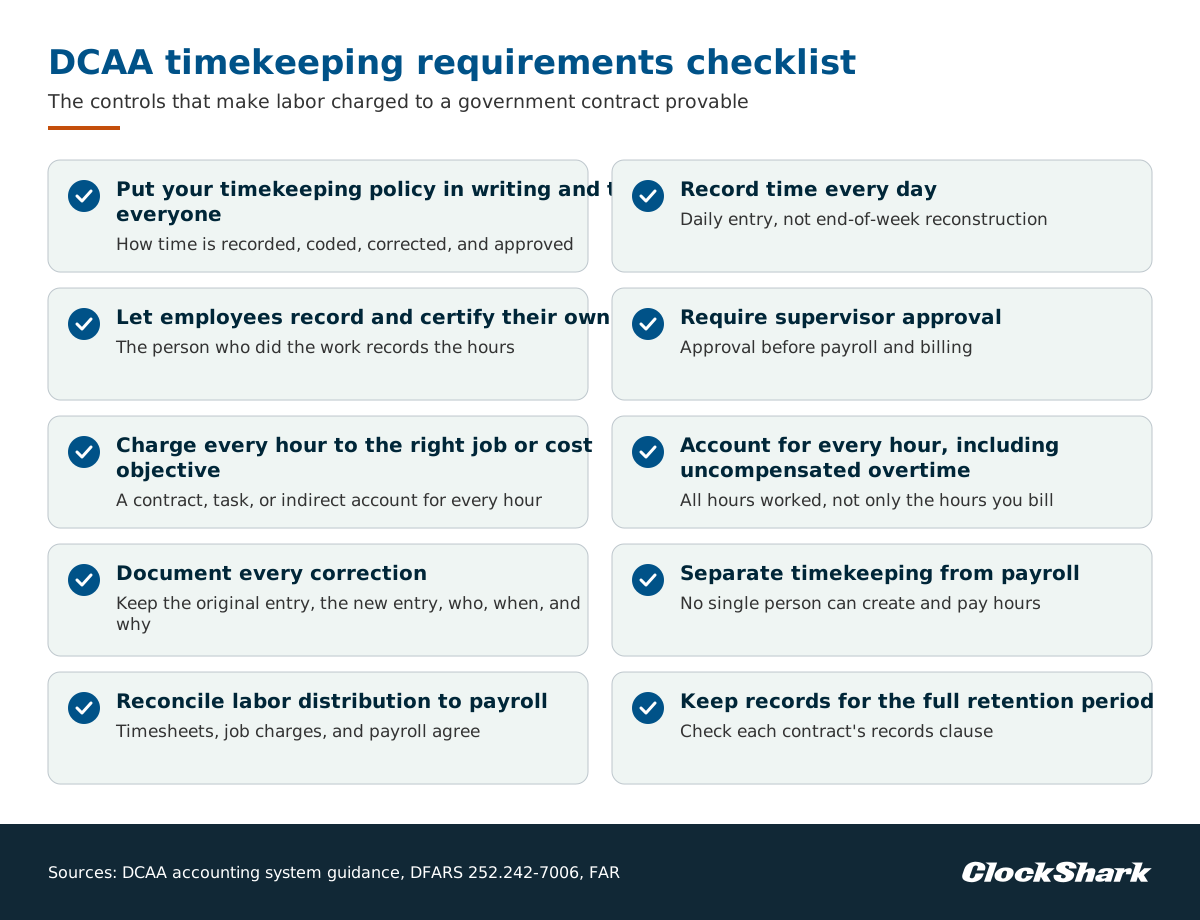
A DCAA compliant timekeeping checklist covers a written policy and training, daily entry, employee self-entry and certification, supervisor approval, charging every hour to the right cost objective, total time accounting, documented corrections, separation of duties, payroll reconciliation, and record retention. Most controls below cite their source, and the rest are recommended practice.
Put your timekeeping policy in writing and train everyone
Write down how employees record time, which charge codes they use, how corrections work, and who approves. Train every employee who records or approves time on it, so anyone asked about their timesheet can explain how they record hours and which codes they use.
The policy also feeds the bigger control picture. The DFARS accounting system criteria call for a sound internal control environment, accounting framework, and organizational structure. A written policy that staff are trained on is one of the clearest signs of that environment.
Record time every day
Daily, contemporaneous entry is the first control to get right. Employees should fill out the timesheet on a daily basis, according to the DCAA accounting system guidance. Filling in a whole week on Friday from memory falls short of that guidance, even when the totals look right.
For time-and-materials work, the FAR payment clause for time-and-materials contracts lists individual daily job timekeeping records as one way to substantiate vouchers.
Let employees record and certify their own time
The person who did the work records the hours. The DCAA accounting system guidance says the timecard should be completed and certified by the employee. If a supervisor or office manager ever enters time for someone else, we recommend your written policy covers the exception and records it.
Make self-entry part of the crew's daily routine. Damon P., a construction contractor, wrote that with ClockShark "everyone knows it and feels like they have control over their own timecards" in a Capterra review. That ownership of the timecard is what you want from self-entry.
Require supervisor approval
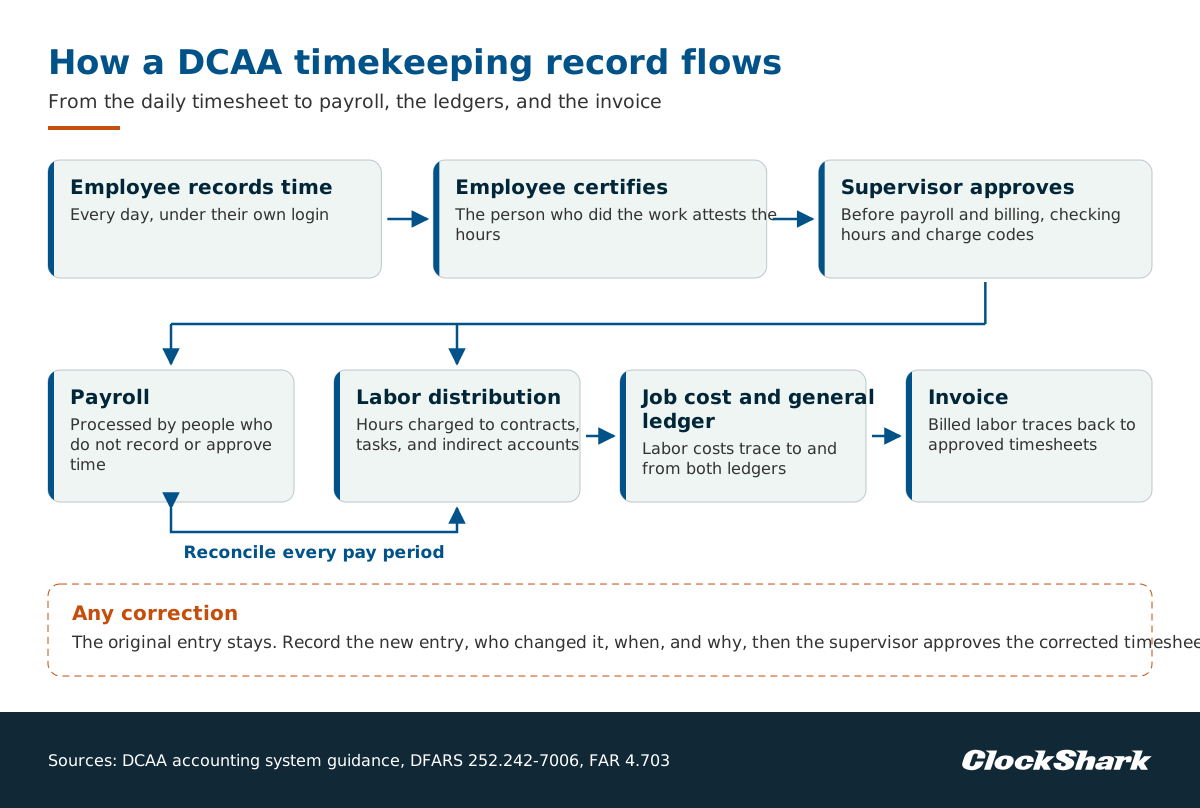
A supervisor reviews and approves each timesheet. The DCAA accounting system guidance describes timecards approved by the employees' supervisors. Ideally, someone who knows the work approves before payroll and billing, so they check both the hours and the charge codes.
Charge every hour to the right job or cost objective
Every hour goes to a specific contract, task, or indirect account. The DFARS accounting system criteria require a timekeeping system that identifies employees' labor by intermediate or final cost objectives and a labor distribution system that charges direct and indirect labor to the appropriate cost objectives. Give crews clear job and task codes, and keep overhead, training, and bid time on their own indirect codes.
Account for every hour, including uncompensated overtime
Total time accounting means recording all hours, not only the hours you bill. Per the DCAA accounting system guidance, timesheets should include all hours worked including uncompensated overtime. This matters most for exempt salaried staff, whose extra hours may go unpaid.
The FAR gives uncompensated overtime a precise meaning. The FAR uncompensated overtime clause defines it as the hours worked without additional compensation in excess of an average of 40 hours per week by direct charge employees who are exempt from the Fair Labor Standards Act.
Document every correction
Mistakes happen, and we recommend a visible correction that leaves the original entry in place. The employee makes or approves the change and records why, and a supervisor approves the corrected timesheet. Your audit trail should keep the original entry, the new entry, who changed it, and when.
Electronic records carry their own rule. When records are kept as computer data, the FAR record retention rule says that for the record retention time periods prescribed, contractors shall not destroy, discard, delete, or write over such computer data.
Separate timekeeping from payroll
We recommend keeping the people who record and approve time apart from the people who process pay, so no single person can create and pay hours. This separation of duties supports the sound internal control environment the DFARS accounting system criteria call for, and a small office can assign approvals and payroll to different people.
Reconcile labor distribution to payroll
Hours on timesheets, labor charged to jobs, and payroll should agree. In the DCAA accounting system guidance, labor cost distribution records should be reconcilable to payroll records and should trace to and from the job cost ledger and general ledger accounts. It's worth running that reconciliation every pay period, not only before an audit.
Keep records for the full retention period
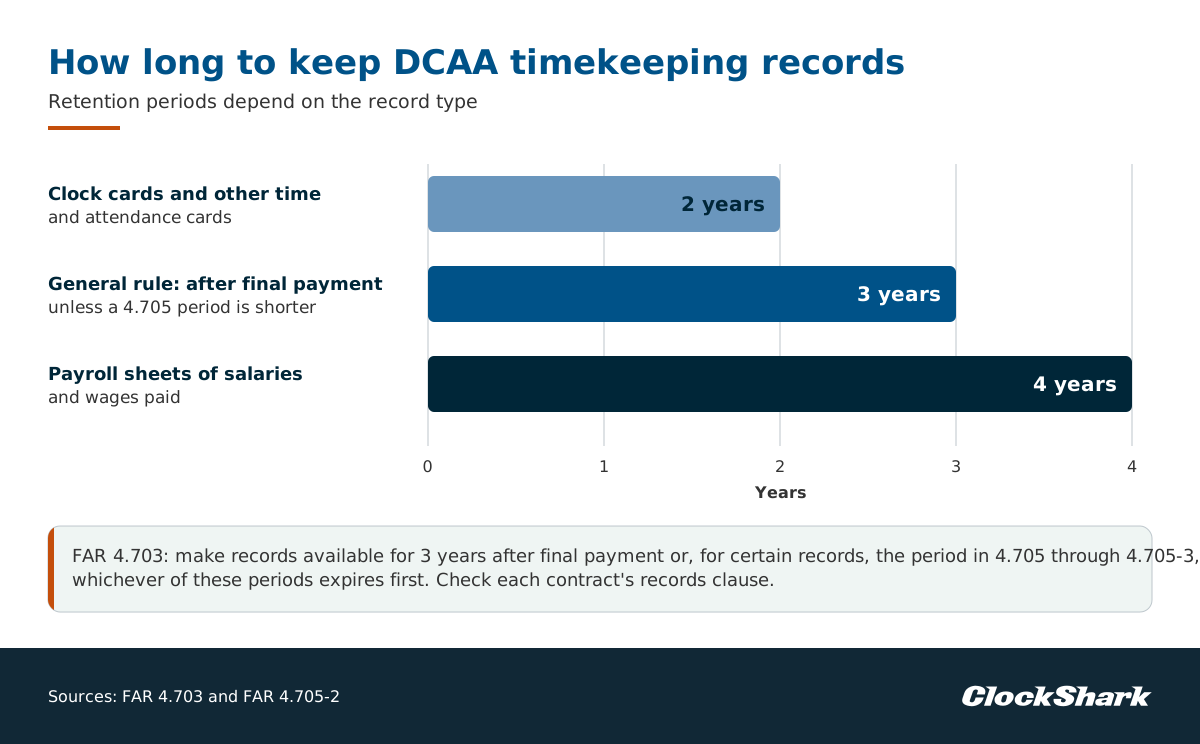
Retention periods depend on the record type. The FAR record retention rule says contractors shall make records available for 3 years after final payment or, for certain records, the period specified in 4.705 through 4.705-3, whichever of these periods expires first.
The FAR pay administration records rule sets 2 years for clock cards or other time and attendance cards and 4 years for payroll sheets of salaries and wages paid for each payroll period. We recommend checking each contract's records clause and keeping timesheets, approvals, and correction history together.
What a DCAA-compliant timesheet looks like
A DCAA-compliant timesheet shows who worked, which days and hours, which contract or charge code each hour went to, the employee's certification, the supervisor's approval, and any correction with its reason. Each field proves one control from the checklist. Use the table to test your current paper or electronic timesheet one line at a time.
| Timesheet field | Control it supports |
|---|---|
| Employee name and ID | The person who worked recorded the time |
| Date and hours for each day | Daily entry, not end-of-week reconstruction |
| Contract, job, and task or charge code for every hour | Labor charged to the right cost objective |
| Indirect, leave, and unpaid hours | Total time accounting |
| Employee certification and date | The employee attests the hours are accurate |
| Supervisor approval and date | An independent review before pay and billing |
| Correction history with reason, user, and date | Changes are visible, not overwritten |
When you review your own timesheets, watch for warning signs. Look for identical hours every day, entries made after the period closed, approvals by the same person who entered the time, and charge codes that drift toward whichever contract still has budget.
DCAA timekeeping for field crews and job sites
Field crews make DCAA timekeeping harder because the work happens away from the office. A foreman can enter hours for a whole crew, paper timesheets come back days late, and job codes get filled in by memory. Each habit risks a control: crew entry weakens self-certification, late paper weakens daily entry, and memory-based codes weaken cost-objective charging.
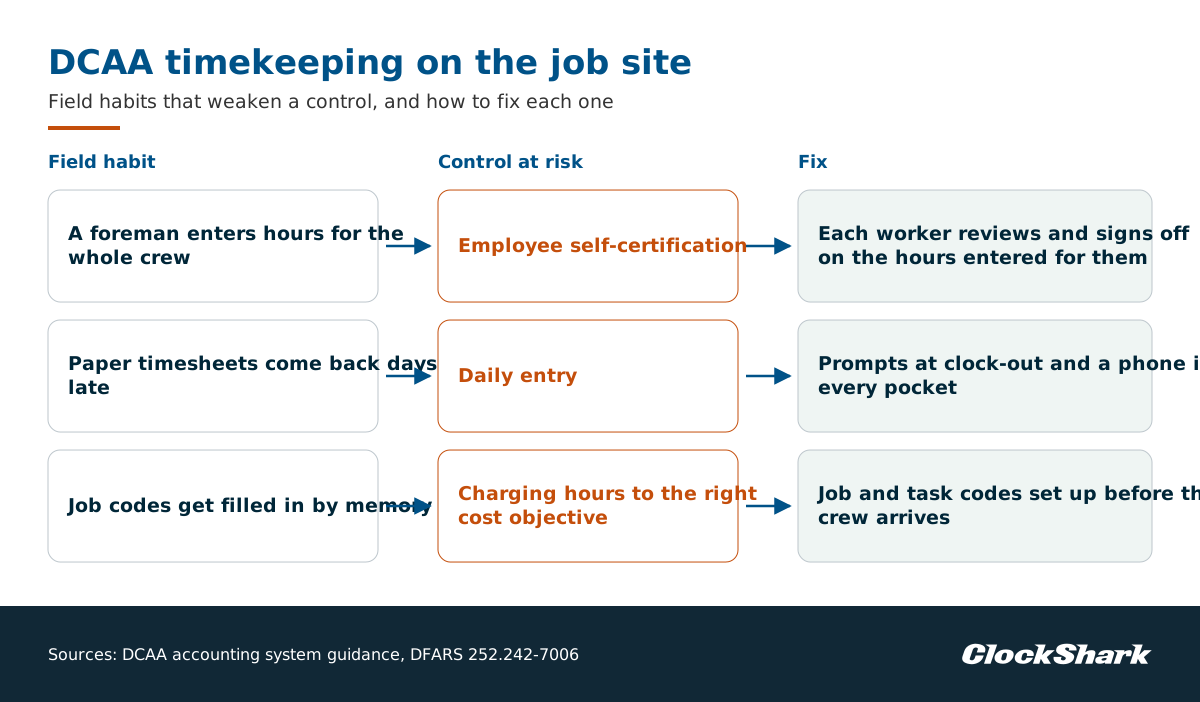
Crew entry needs the most care. When a foreman records time for the crew, each worker should still certify their own hours, because the DCAA accounting system guidance says the timecard should be certified by the employee. Build a step where every employee reviews and signs off on the hours entered for them. A shared kiosk or tablet at the site works the same way when each worker clocks in under their own login.
On a job site, daily entry depends on making it easy at the moment work ends. Prompts at clock-out, a phone in every pocket, and job and task codes set up before the crew arrives keep entries current. GPS location on a clock-in is useful supporting evidence that a worker was where the timesheet says, but it isn't one of the DCAA controls on its own.
Disputed entries add cleanup to field timekeeping. C&L Inspection, a business in the Southern United States, describes manual payroll cleanup and chasing employees to resolve disputed clock-out answers, then simpler payroll and fewer disputed timesheets after switching to ClockShark. For a government contractor, each of those disputes is also a correction that needs a documented trail.
DCAA timekeeping vs. Davis-Bacon certified payroll
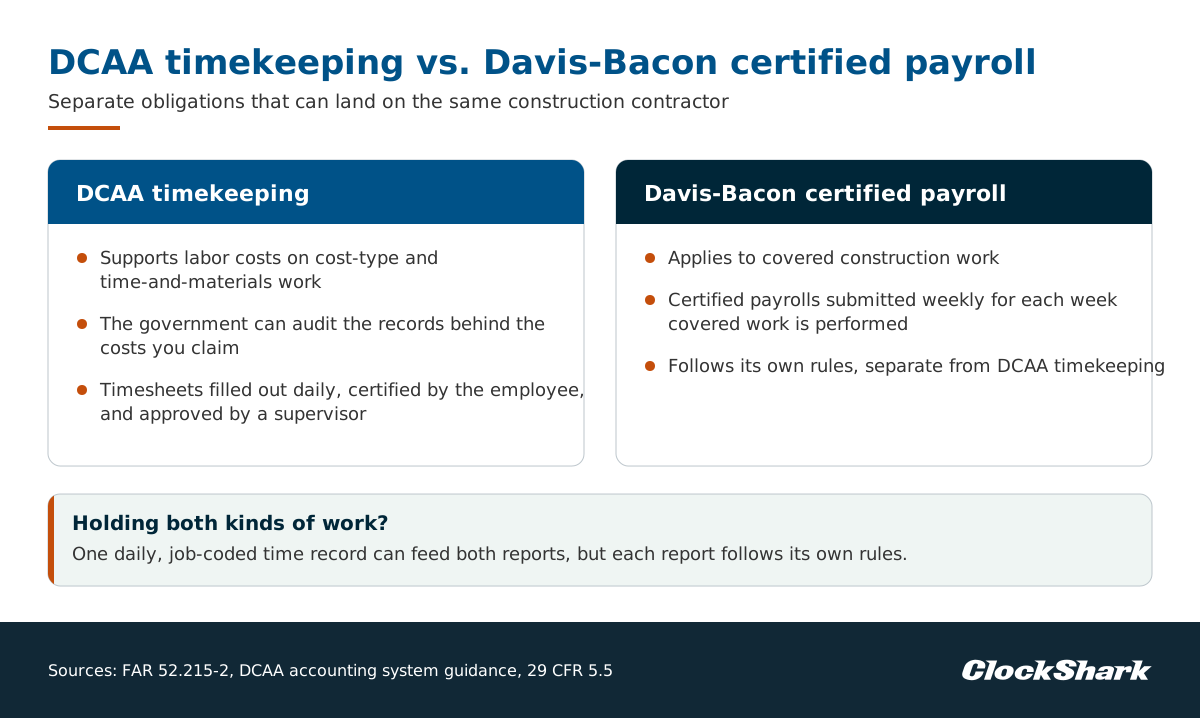
Davis-Bacon certified payroll and DCAA timekeeping are separate obligations that can land on the same construction contractor. On cost-type and time-and-materials work, DCAA timekeeping supports labor costs. Davis-Bacon rules apply to covered construction work and come with their own weekly certified payroll reports, which follow a different set of rules from DCAA timekeeping.
The Davis-Bacon contract clauses say the contractor or subcontractor must submit certified payrolls weekly for each week in which covered work is performed. If you hold both kinds of work, one daily, job-coded time record can feed both reports.
How to prepare for a DCAA timekeeping audit
Preparing for a DCAA timekeeping audit means proving your written process matches what happens on the job. It pays to compare your own policy, timesheets, payroll, and invoices before anyone else does. Start with an internal review, fix the gaps you find, and keep the evidence in one place so you can respond quickly to a request.
- Review your system against the criteria. The DFARS criteria quoted in the DCAA accounting system guidance call for management reviews or internal audits of the system to ensure compliance with your established policies, procedures, and accounting practices.
- Test a sample. Pull a few timesheets per pay period and trace each hour from the timesheet to labor distribution, payroll, and the invoice.
- Prepare your people. The FAR audit and records clause gives the Comptroller General the right to examine your directly pertinent records involving transactions related to the contract or a subcontract, and to interview any current employee regarding such transactions. Your employees should be able to explain what they work on and how they record it.
- Fix the usual problems first. The DCAA accounting system guidance lists failure to properly segregate direct and indirect costs, improper timekeeping, and failure to exclude unallowable costs among common deficiencies.
- Keep support for every cost. The FAR cost principles make you responsible for maintaining records, including supporting documentation, adequate to demonstrate that costs claimed have been incurred, are allocable to the contract, and comply with applicable cost principles.
What happens if you miss DCAA timekeeping requirements?
Missing DCAA timekeeping requirements puts the money you billed at risk. The contracting officer may disallow costs you can't support, and on contracts with the Contractor Business Systems clause, an unacceptable accounting system shall result in withheld payments. Knowingly false labor records can create False Claims Act liability and can cost you government work.
- Disallowed costs. The contracting officer may disallow all or part of a claimed cost that is inadequately supported, per the FAR cost principles.
- Withheld payments. The DFARS accounting system criteria state that failure to maintain an acceptable accounting system shall result in the withholding of payments if the contract includes the Contractor Business Systems clause, and also may result in disapproval of the system.
- False Claims Act liability. The False Claims Act covers anyone who knowingly makes, uses, or causes to be made or used a false record or statement material to a false or fraudulent claim, and adds 3 times the government's damages.
- Per-claim penalties. In the Justice Department penalty table, the adjusted False Claims Act penalty for penalties assessed after July 3, 2025, for violations after November 2, 2015, is $14,308 to $28,619 per violation.
- Debarment. The FAR debarment rules let the suspending and debarring official debar a contractor after a conviction or civil judgment for fraud in obtaining or performing a public contract.
What to look for in DCAA timekeeping software
Software supports DCAA timekeeping, but no single app makes a contractor compliant on its own. The DCAA accounting system guidance quotes the DFARS definition of an accounting system as the contractor's methods, procedures, and controls established to gather, record, classify, analyze, summarize, interpret, and present accurate and timely financial data.
So judge software sold as DCAA compliant timekeeping by how well it supports each control in your written process. Look for:
- Reminders and mobile clock-in that support daily entry for people away from a desk.
- Every employee logging their own time under their own login by default.
- Job and task codes on every entry, including indirect and leave codes.
- Employee certification and supervisor approval, with approved timesheets locked.
- A complete audit trail showing the original entry, the change, who made it, and when.
- Reports and exports that let you reconcile hours to payroll and job costs.
- Long-term record storage that keeps timesheets and history available for the retention period.
Be cautious with any vendor that promises DCAA-certified or DCAA-approved timekeeping. Compliance comes from your process, your controls, and how your team uses the tool.
How ClockShark supports DCAA-aligned timekeeping
Measured against that software list, ClockShark is time tracking software for construction and field service teams whose features can help you support DCAA-aligned timekeeping processes. It doesn't make you compliant on its own. Your written policy, training, approvals, and reconciliation still carry the weight, and ClockShark helps your crews and office follow them.
- Daily entry. With timesheet reminders, ClockShark sends automatic reminders to field crews to clock in and out via mobile push notifications, email, or GPS-triggered alerts when they arrive at job sites.
- Job-coded hours. In time reporting, each clock-in on the app logs the employee, job, task, and location.
- End-of-day confirmation. With clock-out questions, you can assign yes/no questions to a form and mark specific questions as required, so you could set up a required question confirming the hours and codes are accurate.
- Change history. ClockShark's timesheet audit log clearly marks a changed timesheet with the name of the user who edited it and when it was edited.
Supervisor review ties the other controls together. Villa Serena Communities, a Houston property manager with maintenance staff across its communities, describes moving from late paper timesheets and supervisors chasing approvals to GPS-stamped mobile clock-ins and timesheet approval on phones.
With timesheet approvals, managers can verify that each employee's hours are allocated to the correct job and task, and approved timesheets are safely locked against editing. See how timesheet approvals work in ClockShark and map them to your own DCAA timekeeping checklist.
Frequently asked questions about DCAA timekeeping
What are DCAA compliance requirements?
DCAA compliance requirements include the DFARS criteria for an acceptable contractor accounting system. The DFARS accounting system criteria include a timekeeping system that identifies employees' labor by intermediate or final cost objectives and a labor distribution system that charges direct and indirect labor to the appropriate cost objectives.
Timekeeping is one part of a wider set of accounting system criteria.
Who is required to track their time when working on a federal contract?
Contractors on cost-reimbursement, incentive, time-and-materials, labor-hour, or price redeterminable contracts must keep records the government can audit. The FAR audit and records clause requires the contractor to maintain all records and other evidence sufficient to reflect properly all costs claimed, and timesheets are among the records that support labor costs.
What are the federal timekeeping requirements for employers?
Federal wage and hour rules require employers to keep payroll records for covered employees, including the hours worked each day and week. The federal recordkeeping rule lists hours worked each workday and total hours worked each workweek. Government contractors then add DCAA controls on top.
What is timekeeping for payroll?
Timekeeping for payroll is the process of recording the hours each employee works so pay is calculated correctly. For covered employees, the federal recordkeeping rule requires employers to keep records of hours worked each workday and total hours worked each workweek, which become the base for wages and overtime.


